

Every TallyPrime release from official Tally Solutions channels: the current release 7.1, the previous 7.0 (Dec 2025), and all older versions, with official launch dates, system requirements, and a setup guide.
There is no legitimate TallyPrime "crack" or torrent.
Tally Solutions distributes the software exclusively through official channels. Pirated copies risk silent data corruption, GST non-compliance, and IT Act §66 liability, and ship without the Tally Software Services (TSS) updates needed for current GST rules. The download links below are the safe, official ones from Tally Solutions. New users get a full-featured 7-day trial; for ongoing use, see official pricing (Silver lifetime ₹22,500 · Gold lifetime ₹67,500, plus 18% GST) or TSS renewal from ₹4,500/year + 18% GST.
Every TallyPrime release with its official launch date and a direct link to the genuine Tally Solutions download. TallyPrime 7.1 is the current release; 7.0 and earlier come from the Tally support files page.
| Version | Released | What's new | Official download |
|---|---|---|---|
| TallyPrime 7.1 (Current release) | 2026 | Customisable invoice print templates, Auto Wrap Text, ICICI bank payments, improved IMS reconciliation, Schedule III financials | Download 7.1 → |
| TallyPrime 7.0 (Previous release) | December 19, 2025 | Auto Backup, PrimeBanking direct payments, SmartFind, Invoice Management System (IMS) | Support files → |
| TallyPrime 6.2 | August 18, 2025 | Arabic & bilingual invoice export (PDF / e-mail / WhatsApp), Tax Invoice Format 2 as default | Support files → |
| TallyPrime 6.1 | June 16, 2025 | Full IMS (download, act, upload, reset), Edit Log Summary, GSTR-2B recompute, offline GSTR-1 via Excel/CSV | Support files → |
| TallyPrime 6.0 | March 23, 2025 | Connected Banking with enhanced reconciliation, smoother Data Split with robust verification | Support files → |
| TallyPrime 5.x & earlier | 2020–2025 | 5.1, 5.0, 4.1, 4.0, 3.0, 2.1, 2.0: see the full Release History below for details | Support files → |
Release dates are taken from the official Tally Solutions release notes (help.tallysolutions.com) where the notes state one. TallyPrime 6.0 is shown as 2025 without a month because the vendor's own sources conflict: the release notes state January 24, 2025, but that same page documents Finance Bill 2025-26 provisions, and that bill was presented on 1 February 2025. The archived installer is dated 23 March 2025. We would rather name the conflict than pick a month the evidence contradicts. Every link points to genuine Tally Solutions download channels. Licence pricing: Silver lifetime ₹22,500 · Gold lifetime ₹67,500 (plus 18% GST); see official pricing.
Choose between standard TallyPrime 7.1 or TallyPrime 7.1 with Edit Log enabled for MCA compliance requirements.

The current release from Tally Solutions
For India's MCA compliance
Note: Edit Log is disabled by default in standard TallyPrime. Choose TallyPrime Edit Log version if you need permanent audit trail for MCA compliance or internal control requirements.
TallyPrime 7.0 introduces groundbreaking features that streamline business operations and enhance productivity for modern enterprises.
TallyPrime 7.0's Connected Banking feature transforms how businesses manage their financial operations. Direct integration with major banks like Axis Bank and State Bank of India enables real-time bank statement import and automatic transaction reconciliation. Read our complete Connected Banking setup guide →
Secure your business data with TallyDrive's automatic cloud backup solution. Your critical financial information is protected and accessible from anywhere, ensuring business continuity and data security.
SmartFind revolutionizes data discovery in TallyPrime with intelligent search capabilities. Find any transaction, party, or item instantly across your entire database with smart filters and contextual suggestions.
The comprehensive Invoice Management System streamlines your entire invoice workflow from creation to compliance. Manage purchase and sales invoices with complete e-invoice integration and GST compliance. You can even file GSTR-1 directly from TallyPrime without visiting the GST portal.
Auto-match transactions with 145+ bank formats supported for quick reconciliation and accurate financial reporting.
Optional or permanent audit trail for all transaction changes - MCA compliant with comprehensive tracking capabilities.
Improved processing speed, optimized memory usage, and faster report generation for better user experience.
Every release below is available in two builds. Standard TallyPrime ships with Edit Log switched off so you can enable it when you need it. TallyPrime Edit Log keeps the audit trail permanently on, which is what MCA compliance asks for. Both installers for each version are linked directly.
Arabic and bilingual invoice sharing for GCC businesses
Invoice Management System and Edit Log Summary enhancements
Introduction of Connected Banking and automation features
Connected GST filing, TDS 194Q, Arabic and Bangla
MSME UDYAM details and the e-Commerce Summary report
WhatsApp for Business, Excel import, graphical dashboard
Ensure your system meets these requirements for optimal TallyPrime 7.0 performance and all advanced features.
Operating System
Windows 7 or above, 64-bit
Processor
Intel Core i3 or AMD equivalent
RAM
4 GB (8 GB for multi-user)
Storage
1 GB free disk space
Operating System
Windows 11 (64-bit)
Processor
Intel Core i5/i7 or AMD Ryzen 5/7
RAM
8 GB or higher
Storage
SSD with 5 GB free space
Internet Connection
Required for Connected Banking, TallyDrive, and updates
Browser
Chrome, Firefox, or Edge for web-based features
Security
Windows Defender or compatible antivirus
Network
TCP/IP for multi-user and server configurations
Performance Tip
For optimal performance with Connected Banking and TallyDrive features, ensure a stable internet connection with minimum 2 Mbps speed. SSD storage significantly improves data processing and report generation times.
setup.exe to start installation
Note: When you upgrade a TallyPrime release to a TallyPrime Edit Log release, the settings and persistent configurations such as views saved for reports get carried forward.
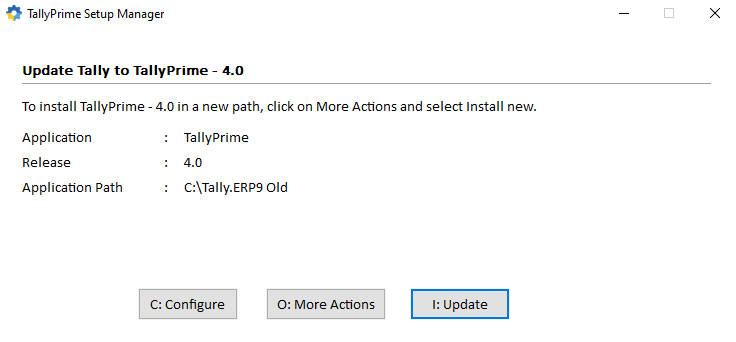
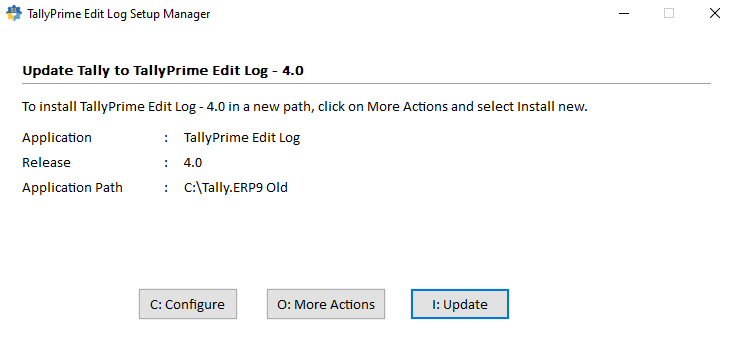
Common issues and solutions for TallyPrime download, installation, and activation problems.
Check your internet connection stability. Use a download manager for large files. Try downloading during off-peak hours for better speeds.
Clear browser cache and cookies. Temporarily disable antivirus/firewall. Try using a different browser or incognito mode.
Run setup.exe as Administrator. Ensure you have sufficient disk space. Check Windows User Account Control settings.
Restart the installation process. Temporarily disable antivirus software. Close all other applications during installation.
Uninstall previous TallyPrime versions before installing 7.0. Use Windows Add/Remove Programs feature for complete removal.
Verify your internet connection. Check if your TSS (Tally Software Services) is active. Contact your Tally partner for license verification.
Renew your TSS subscription through authorized Tally partners. Existing data remains intact after renewal.
Educational mode has limited features and data entry capabilities. Upgrade to licensed version for full functionality.
TallyPrime is designed for Windows. Mac users can run it using virtualization software like Parallels Desktop or VMware Fusion.
Yes, TallyPrime can import data directly from Tally.ERP 9. The migration process preserves all your existing data and configurations.
TSS includes software updates, new feature releases, statutory updates, and technical support from authorized partners.
Our certified Tally experts are ready to assist you with installation, setup, and troubleshooting.
TallyPrime 7.1 is the current release; 7.0 shipped in December 2025. Detailed feature breakdowns for every recent release.
TallyPrime 7.1
Invoice print templates, ICICI banking, HSN/SAC validation
Previous releaseTallyPrime 7.0
SmartFind, Auto Backup, PrimeBanking, IMS, JSON export
TallyPrime 6.2
Smart invoicing, multi-language support, global features
TallyPrime 6.1
IMS, Edit Log enhancements, MSME compliance
TallyPrime 6.0
Connected Banking (Axis, SBI), bulk e-invoicing, GST refresh
Explore Silver and Gold editions with pricing from Rs.22,500.
Annual maintenance and remote support packages for your business.
Complete changelog from 1.0 to 7.0: every feature, every release.
Take our 30-second quiz to find the right TallyPrime edition for you.
Renew your Tally Software Services (TSS) to continue receiving updates, new features, and support.
Renew TSS NowIf you are evaluating plans, renewal, cloud migration, or support, use these quick decision pages: